Traveller Lifepath

Contents
  1. Overview
  2. Reviews

Overview

A free, accessible, browser-based character creator and editable sheet for Mongoose
Traveller 2022 https://groupfinder.eu/library/traveller-2e-2016
— every roll cited, every choice logged, every character saved locally.

Description

Traveller Lifepath is a free, browser-based character creator and editable sheet for Mongoose Traveller 2022. It walks players through the full Mongoose 2022 lifepath — basics and species, characteristics, background skills, pre-career education (University, Army Academy, Marine Academy, Navy Academy), career terms with their full survival / event / commission / advancement loop, mustering-out, the post-creation skill package, and a final reviewable character sheet — without ever leaving a single browser tab.                                                              The tool offers three ways to set characteristics. Players who want the classic experience can have the site roll 2D × 6 into a pool and assign each value to whichever stat they like. Players who prefer their own physical dice can enter results manually; the site still tracks every DM, target, success/failure, and aging effect. Players who'd rather skip randomness entirely can use the included point-buy method (42-point budget, 2..12 per stat). PSI is rolled separately when psionics are enabled, and the Psion career unlocks accordingly. 
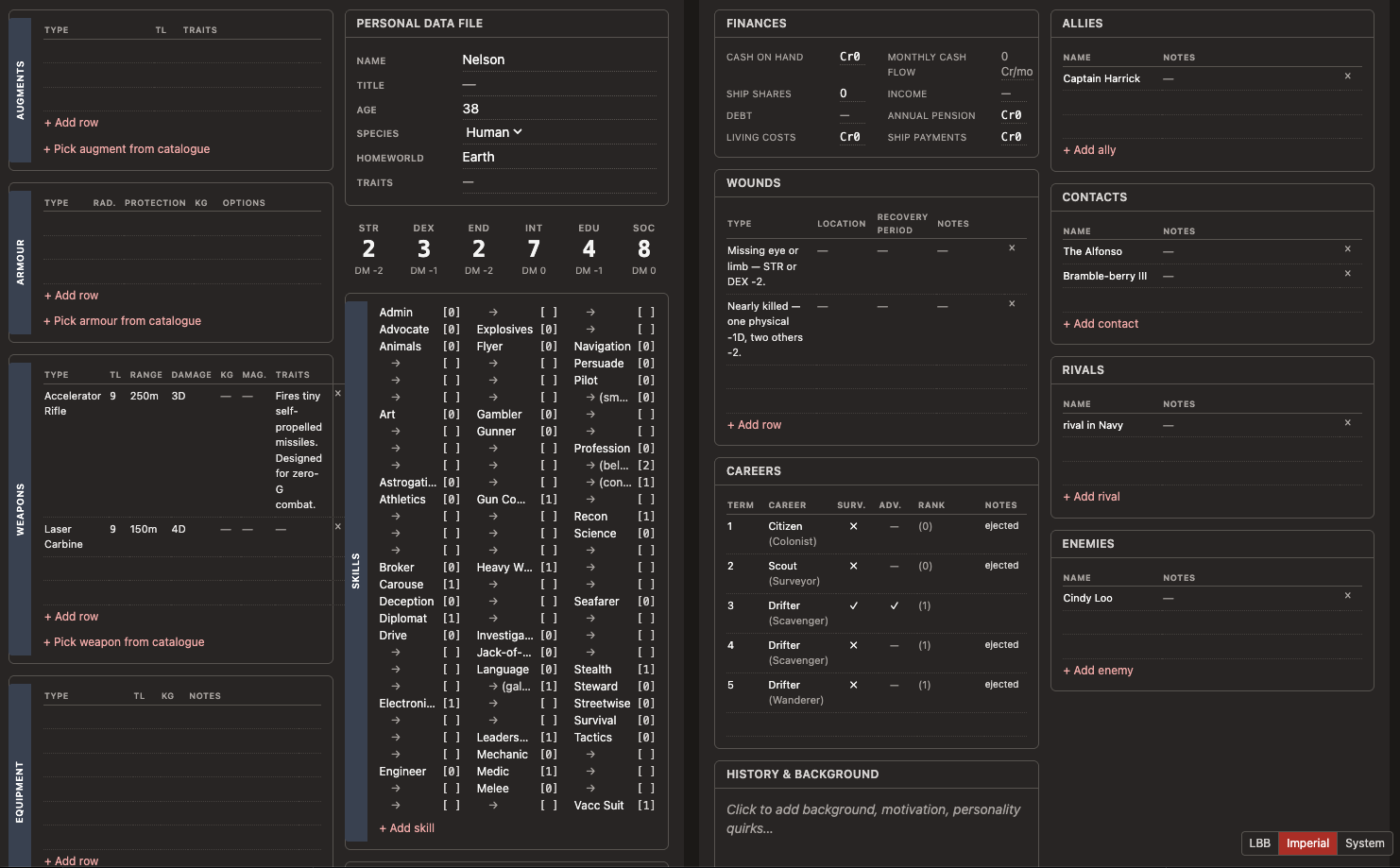
The character-creation rules are implemented as a typed effects engine — TypeScript discriminated unions with exhaustive switching — so every rule lives in one place and can be tested in isolation. The project ships with around 360 automated tests covering qualification, commission, advancement, aging crises, mishaps, life events, connections, the skill cap of 3 × (INT + EDU), pre-career education, and the Mongoose 2022 errata clarifications for Vargr and the Vacc Suit skill. A full audit trail of every rolled die, every applied DM, and every player choice is captured to a roll log that updates in real time. The post-creation sheet is a fully editable Mongoose-style character record. Skills, careers, equipment, weapons, armour, augments, connections, benefits, and free-form notes can all be edited inline; values save automatically to localStorage with cross-tab synchronisation, and the sheet is print-friendly (one panel per printed page, ink-friendly styling). Every character in the local library can be exported and re-imported as JSON for backup or for handing off between players.                                                      Two visual themes are included: a light "Little Black Books" look in the spirit of Classic Traveller, and a dark "Imperial" theme — plus a System mode that follows the operating system's light/dark preference and reacts live when it changes. Theme choice is remembered between sessions.                                                                    Accessibility is treated as a first-class concern. The interface meets WCAG 2.1 AA contrast requirements in both themes (verified by an axe-core audit suite that runs as part of the project's tooling), every interactive element has a visible keyboard focus indicator, icon-only buttons carry ARIA labels, and the layout includes a skip-to-content link for screen-reader users.           
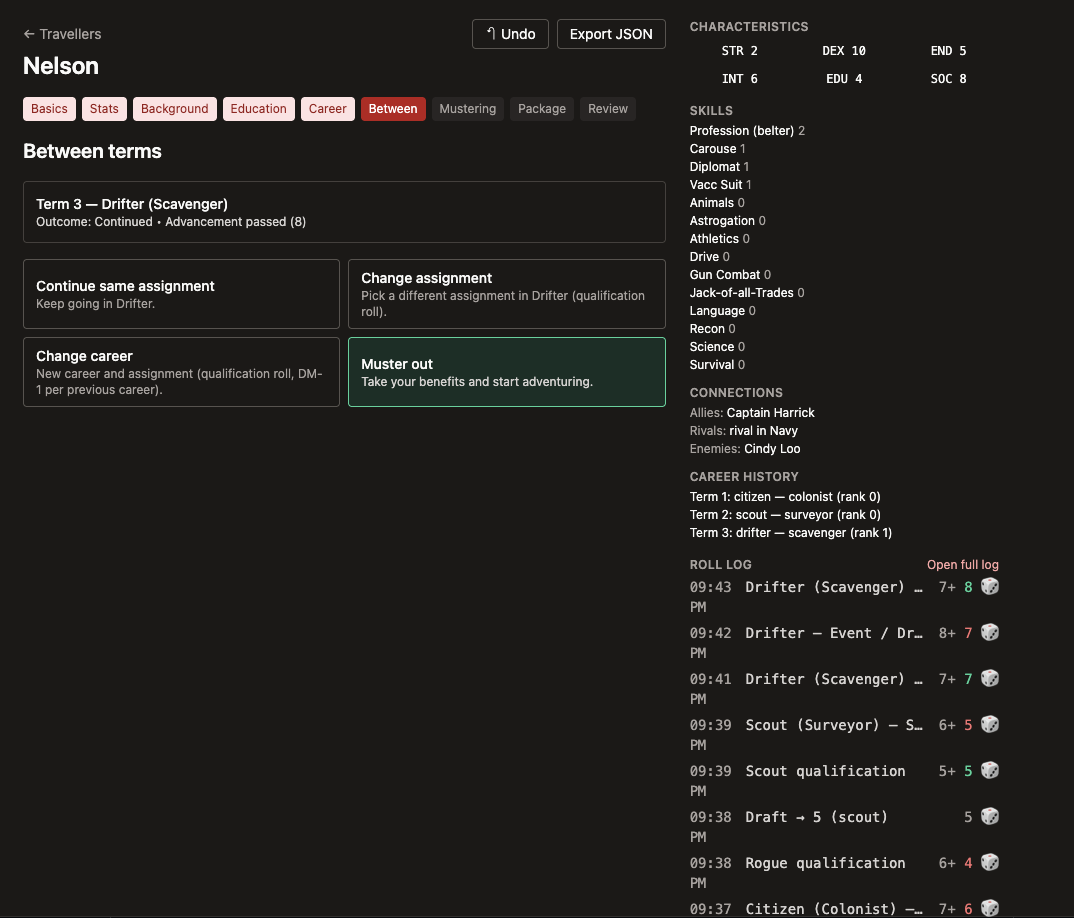
Other features include undo across the wizard (rewinds to the relevant picker after popping a character snapshot), URL-based debug logging (?debug=1), the Connections rule for shared PC backgrounds, an aging-crisis path with medical-debt accumulation, and an honest "unofficial fan tool" disclaimer in every place it matters.                            The project is open-source under the MIT License, runs entirely client-side with no backend and no account requirement, and uses privacy-friendly analytics (no cookies). Bug reports, rules questions, and pull requests are welcome on GitHub.

Links

bytesbynelson.github.io https://bytesbynelson.github.io/traveller-lifepath/ - Live tool github.com https://github.com/BytesByNelson/traveller-lifepath - Source code github.com https://github.com/BytesByNelson/traveller-lifepath/issues - Issue tracker / feedback

Other entries

Overseer Studio
Tools & Platforms

Overseer Studio

English
Paid
Organization
Overseer Studio is a modern, desktop based "Digital GM Screen" designed to solve the problem of browser tab bloat and fragmented software during tabletop sessions. Developed by Tom (the creator behind Astral TableTop and dddice), it is an offline first application that allows Game Masters to consolidate all their digital tools—including VTTs, PDFs, and web browsers—into a single, infinitely customizable workspace. It is currently moving through its Early Access phase in mid 2026, positioning itself as the ultimate organizational layer for the modern "hybrid" or online GM. Description Overseer Studio is not a Virtual Tabletop; rather, it is a "tool for your tools." It provides a modular canvas where a GM can embed windows for D&D Beyond, Spotify, Obsidian, and Roll20 side by side. By using a system of "tiles," GMs can create custom layouts that fit their specific workflow, switching between different "screens" with keyboard shortcuts. Because it is a local desktop application that requires no subscription or internet connection to run, it offers a level of stability and privacy that cloud based alternatives cannot match. System Overview & Key Features Infinite Modular Canvas The core of Overseer is an infinite workspace where you can place "tiles." These tiles can contain anything from a simple notepad or a PDF viewer to a fully functional web browser. You can resize, group, and tab these tiles together to create the perfect command center for your specific campaign. VTT and Tool Embedding Overseer is designed to play well with others. You can natively embed Foundry VTT, Roll20, or Owlbear Rodeo directly into your screen. This allows you to manage your map and tokens in one tile while keeping your campaign notes and creature stat blocks visible in another, eliminating the need to Alt-Tab between programs. Offline First Architecture The application runs entirely on your hardware (Windows, macOS, or Linux). This ensures that your game is never interrupted by server outages or slow internet speeds. Your data remains on your machine, giving you total ownership over your preparation materials. Pop-out Player Sharing While the software is for the GM, you can "pop out" any tile—such as a map, a piece of concept art, or a video—into a separate window. This window can then be shared via Discord or Zoom, or cast to a physical TV for in-person groups, allowing you to control exactly what the players see. Extensible Plugin SDK For power users, Overseer features a robust SDK. Extensions are built using standard web technologies (HTML/JS), allowing the community to create custom dice rollers, soundboards, or automation tools that can "talk" to each other across different tiles within the session. One Time Purchase Model In a market dominated by monthly fees, Overseer Studio is a "buy once, own forever" product. There are no account requirements or hidden subscriptions, and all future updates are included in the initial purchase price, making it a highly cost effective solution for long term GMs. Additional links overseer.studio - Official Overseer Studio website discord.gg - Official Discord for beta testing and development updates

Read more

Fearless Few Gaming
Video

Fearless Few Gaming

TTRPG
English
Youtube
Fearless Few Gaming is a cinematic tabletop RPG channel built for a new generation of players, those who want to experience games before they ever sit down at the table. Founded by filmmaker and video production professional Will Ezell, the channel blends high end visual storytelling with practical, no nonsense breakdowns of tabletop RPG starter sets, boxed experiences, and complete entry points into the hobby. Every video is designed with a simple goal: remove the friction between curiosity and play. At its core, Fearless Few Gaming answers a question most channels overlook: “If I buy this box...what is it actually like?” A Channel Built Like a Production, Not a Review /images/general-media/1774041361_6040Hs97.png Fearless Few Gaming doesn’t operate like a traditional review channel. It operates like a production studio. Each episode is structured with intentional pacing, visual storytelling, and layered editing designed to mirror the experience of opening, learning, and playing a game in real time. From cinematic box reveals to dice shots and fully themed environments, every visual element reinforces immersion, not just information. This is not just coverage. It’s translation, taking complex systems, dense rulebooks, and intimidating boxes, and turning them into something watchable, and exciting so that you can decide for yourself. The Starter Set Society /images/general-media/1774041350_XQs9giAp.png The flagship series, The Starter Set Society, is the backbone of the channel and its defining identity. Each episode explores a curated starter set or boxed RPG experience and breaks it down through three lenses: - What’s actually inside the box - How the system plays at the table - Whether it delivers a compelling first session The format prioritizes clarity and momentum. Mechanics are explained lightly and cleanly then the focus shifts to experience. How it feels to play, how quickly players engage, and what kind of stories emerge. Episodes are structured to guide viewers from curiosity to confidence in around ten minutes. Designed for Discovery Fearless Few Gaming is built with discoverability in mind, both for viewers and for the games themselves. Each video is optimized to serve as an entry point into the hobby, using clear framing, accessible language, and tightly structured pacing that respects the viewer’s time while delivering real value. The channel actively targets new and returning players searching for the best way to start tabletop RPGs, positioning itself as a trusted first stop in that journey. It doesn’t just serve existing fans, it helps create new ones to keep the hobby thriving. Tone, Style, and Identity The voice of Fearless Few Gaming is confident, cinematic, and grounded. It avoids over explaining, avoids gatekeeping, and avoids the academic tone that often dominates the hobby. Instead, it delivers insight through perspective: what works, what stands out, and what actually matters when the game hits the table. Visually, the channel leans into bold, high contrast presentation with thematic lighting, stylized environments, and deliberate framing choices that elevate tabletop content into something closer to film. The Mission Fearless Few Gaming exists to make tabletop RPGs easier to start, more exciting to explore, and impossible to ignore. By combining professional level production with a deep understanding of what new players actually need, the channel lowers the barrier to entry for one of the most creative hobbies in the world. It doesn’t just review games. It builds the moment where someone decides to play their first one. Links Youtube channel

Read more

Forge Steel
Tools & Platforms

Forge Steel

English
Free
Toolkit
Forge Steel is a community-developed, locally-hosted web application and digital utility designed for Draw Steel, the cinematic fantasy tabletop role-playing game created by MCDM Productions. Developed by independent community members during the game's playtest phase, the application functions as a lightweight encounter builder and combat manager. It is specifically built to assist Directors in organizing game data and tracking real-time combat statistics during a session. Description Forge Steel serves as a digital toolkit for preparing and executing combat encounters in Draw Steel. In contrast to cloud-based alternatives, Forge Steel relies on local browser storage. This means the application does not require users to create an account or rely on external servers to save their data. All created encounters, customized monsters, and campaign notes are stored directly within the cache of the user's web browser. This architecture prioritizes data privacy, offline accessibility, and fast load times, though it requires manual file exporting to transfer data between different devices. System Overview & Key Features Local Storage Architecture The application operates entirely within the user's web browser without communicating with a backend database for everyday use. Because it utilizes local storage, no login credentials are required. This ensures the tool remains highly responsive and can continue to function even if the user loses their internet connection during a game session. Encounter Construction Directors can use the tool to design combat encounters by selecting monsters from an integrated database. The application automatically calculates the total Encounter Value, allowing the Director to balance the difficulty of the fight against the level and size of the player character party. Active Combat Tracking During gameplay, Forge Steel provides a dashboard to manage the flow of combat. It tracks essential Draw Steel mechanics, including monster Stamina, current initiative groups, temporary status effects, and the accumulation of Villain Power. This centralized view reduces the amount of physical bookkeeping required by the Director. Integrated Bestiary The application includes a searchable bestiary containing the official monsters released during the Draw Steel playtest and early access periods. Directors can quickly filter these creatures by role, level, or faction, and view their complete stat blocks, abilities, and passives directly within the app. Import and Export Functionality To mitigate the limitations of local-only storage, Forge Steel includes manual data management tools. Users can export their prepared encounters, custom bestiaries, and campaign data as JSON files. These files can then be saved as backups or imported into Forge Steel on a different computer or browser, allowing for manual cross-device syncing. Homebrew Integration Directors have the ability to manually input and modify monster statistics. This allows users to create custom adversaries or tweak existing official monsters to fit their specific campaign needs. These custom entries are saved locally alongside the official bestiary. Additional links forgesteel.net - Official toolkit website

Read more

Reviews

Sorted by:

No reviews yet.

Login to leave a review.